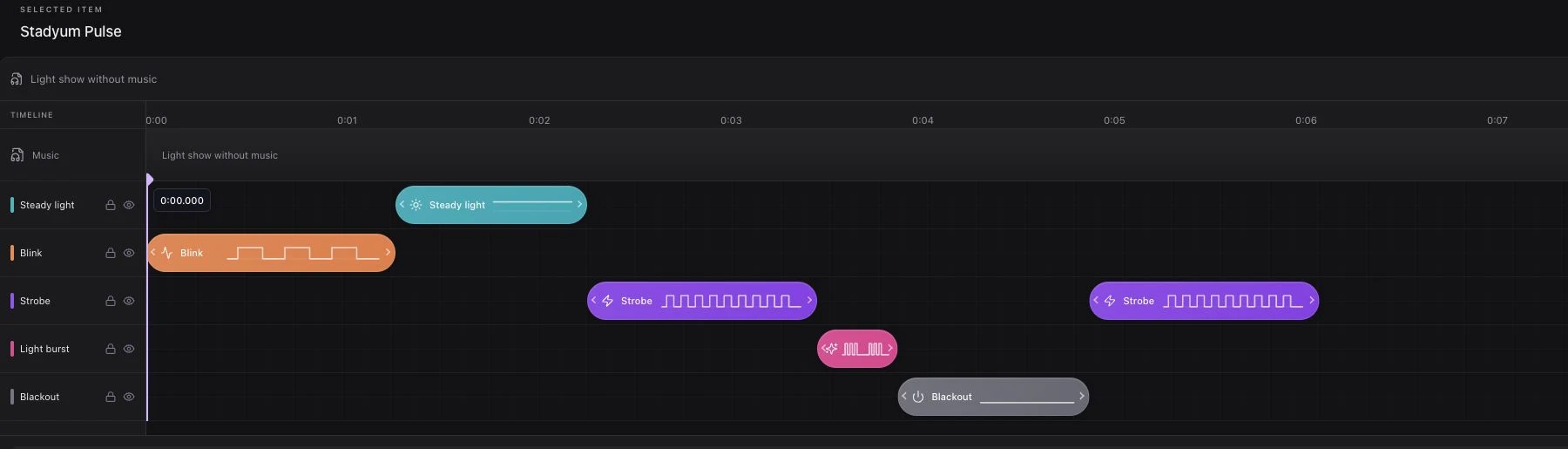
Planning a phone light show means preparing the audience journey, music and light sequence, venue connectivity, and operator responsibilities together. A useful first step is to choose one show moment and build a clear flow around it.
This guide takes stadium, concert, and festival teams from preparation to live playback. Venue, audience, and device conditions vary, so validate the plan through a rehearsal in the actual event space.
Define the Show's Purpose and Place
Decide how the light moment belongs in the event. A player entrance, chorus, product presentation, and finale each need different preparation.
- Which stage cue or announcement starts the show?
- Which music recording will be used, and are its use rights clear?
- When should guests raise or orient their phones?
- Who owns starting and stopping playback?
- What happens if the event schedule changes?
Write a short production brief. When the stage, audio, screen, and operator teams use the same brief, last-minute adjustments are easier to communicate.
Prepare the Event Flow in Studio
Create an event in the panel. Add music from the library or upload a file. The event's ordered items form the flow you will use during the show; prepare music and lights around that sequence.
Edit the selected item's flashlight effects and phone-screen colors in Studio. Preview locally on the operator's device first. Check that changes have saved before moving to the next item or starting live playback.
Make the controls' meanings clear to the whole production team:
| Action | Result |
|---|---|
| Preview | Checks the design on the operator's device |
| Go live | Opens the live session for participants |
| Play | Starts the selected item or event flow |
| Stop | Stops playback while the session remains open |
| End event | Closes the live session |
Edits made after a show has started apply to later playback. If a critical change is necessary, stop, complete the save, and restart at the appropriate production cue.
Plan the QR Invitation and Audience Instructions
A QR code must be scannable from the audience's position, not merely visible. Use the brand logo, a prominent code, and a short call to action in the display artwork. Choose a horizontal or vertical presentation that suits the screen.
Try scanning with real phones from different seats and audience locations. Glare, screen angle, moving decorative backgrounds, and distant copy can make joining difficult.
Keep the announcement short: “Scan the QR code, join, and keep your phone ready.” Explain screen light and retry options clearly for guests who encounter permission or connection issues.
Camera permission is requested when a guest joins if it is needed for flashlight control. The light experience does not record or upload camera footage. Screen light remains the fallback when permission is declined or torch access is unavailable.
Read how to place QR codes in stadiums for a detailed placement plan.
Rehearse Venue Connectivity and Devices
Start with the audience's actual network access. Do not assume that the operator connection and guest connections behave alike. Audience density, covered stands, and outdoor conditions can change coverage.
Use this rehearsal checklist:
- Scan the QR code from representative audience locations.
- Try joining on both iPhone and Android devices.
- Decline camera permission and check screen light.
- Include a phone without browser flashlight support.
- Review connection loss and reconnection.
- Check Stop and End event, including pending items.
- Confirm that the operator can follow the audio and stage announcements.
Confirm the account capacity with the platform team before the event. An estimated attendance figure alone is not technical approval; the intended infrastructure and simultaneous connection needs must be reviewed together.
Adapt Operation to the Event Format
Concert
Agree on the show moment with the artist and audio team. Live performance length can change, so define the track-start and stop cues. See planning a concert phone light show.
Stadium
Coordinate QR display, player entrance, and the public-address plan. Check visibility from different stands. The show must fit the sporting and safety operations.
Festival
Guests move between stages. Make it clear which event is live and what the QR invitation connects them to. Include ambient light and audience connectivity in the rehearsal. One event can be live per account at a time; simultaneous stages need a separate reviewed plan.
Prepare the Next Event From What You Learn
Record production notes promptly: which instruction was unclear, where connections failed, and which announcement worked. Review the participation information available in the panel alongside those notes.
Social reach, sponsor recall, and satisfaction each require their own measurement method. Follow the evidence your team has chosen rather than assuming a light show automatically improves every outcome.
Compare field requirements in LED wristbands vs. phone light shows, or request a demo to review your event flow together.