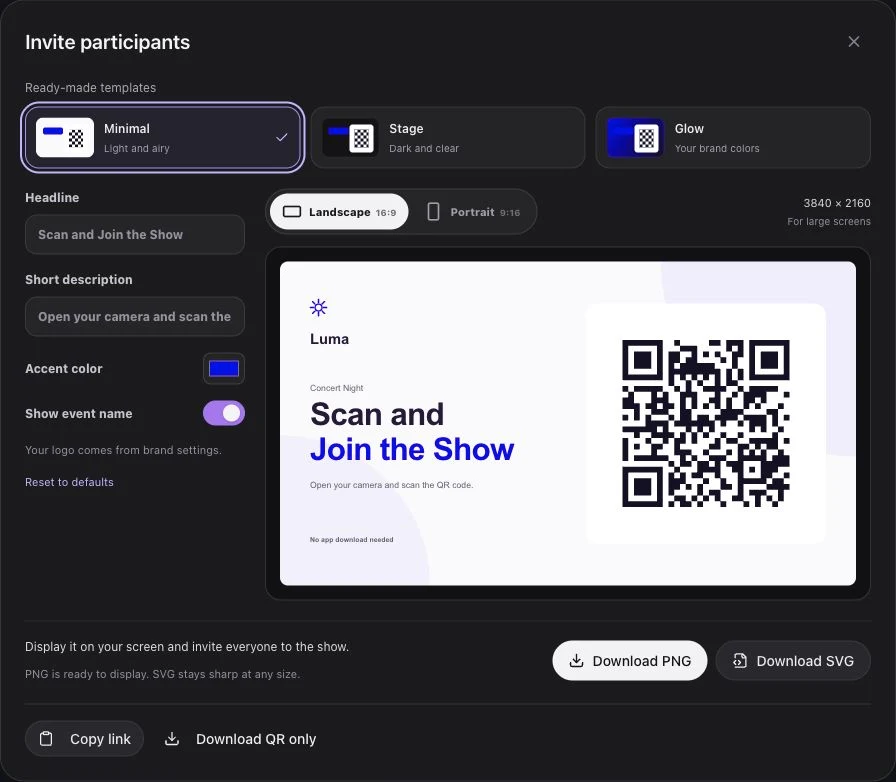
A stadium is more than the place where a game happens. Fans build its atmosphere through sound, movement, and shared rituals. A QR code phone light show can add a visual role to those rituals when the invitation and production cue are planned together.
The QR code is an entry point. The strategy includes what fans see before scanning, what their phones show after joining, and how the moment fits the game-day schedule.
Why Use a QR-to-Browser Invitation?
An app-based activity may ask fans to install software, create an account, and complete an onboarding flow. Luma Crowd's core light-show journey is shorter:
- Scan the QR code.
- Open the mobile participation page.
- Tap Join and prepare for the cue.
Removing an app download reduces the number of steps. It does not guarantee a particular participation rate. Fans still need a readable invitation, adequate network access, and a reason to participate.
Plan Four Parts of the Experience
1. Reach and Invitation
Map the screens and audience positions from which the code will be scanned. Prepare a short public-address message and a readable fallback link where practical. Rehearse the displayed artwork on the actual scoreboard or venue screen.
2. The Game-Day Moment
Choose an entrance, halftime presentation, or celebration that belongs in the production plan. Prepare team colors, music, and light effects around that moment. Keep the operator's responsibilities clear.
3. Evidence and Review
Separate live operational information from wider experience research. Connected and ready counts help the operator; production notes, footage, and separately collected audience feedback answer other questions.
4. Sponsor Presentation
Agree on where a sponsor belongs in the show and how the brand will be presented. Keep the fan experience central. Do not treat a connected phone as a verified advertising impression without a suitable measurement method.
Build a Game-Day Flow
Before the Main Cue
Display the QR invitation before the player entrance or performance begins. Use a short announcement such as “Scan, join, and help light up the stands.” Give fans time to open the page and see a clear waiting or ready state.
Camera permission may appear after Join to enable supported flashlight control. Explain that camera footage is not recorded or uploaded by the light-show experience, and that screen light is available as a fallback.
At the Planned Moment
The operator presses Go live to open the session and Play to start the prepared item or flow. These are separate actions. Local Preview is for the operator and does not broadcast the show.
Fans who prepared earlier do not need to scan the same QR code again when the session opens.
At the End
Stop cancels playback, including pending items, while leaving the session open. End event closes it and returns participants to waiting. Rehearse both actions with the team so the audience is not left with an unexpected active light.
Operational Details That Help Fans Join
- Test QR size from representative seats, including distant sections.
- Keep the code high contrast and free from moving overlays.
- Use one short instruction that matches the phone page.
- Coordinate the invitation screen and public-address message.
- Explain the waiting state so guests know joining succeeded.
- Include screen-light fallback in the device rehearsal.
- Review the actual audience network, not only the operator's connection.
- Make participation voluntary and keep essential event information separate.
The phone-flash synchronization guide explains the timing considerations for the technical team.
Design Sponsor Moments With Restraint
A brand-color transition can sit within a halftime sequence without overwhelming the team's identity. A short sponsor introduction can explain who supported the experience while keeping the fan's role clear.
A celebration after a game moment should be triggered by the operator within the approved production plan. Do not assume automatic score-system integration unless it has been specifically implemented and reviewed.
Use an Honest Review Framework
| Evidence | What it supports | Limitation |
|---|---|---|
| Connected device count | Current session connections | Not a unique-person count |
| Ready state | Whether devices are prepared | Not proof of attention |
| Production notes | Invitation and connectivity observations | Dependent on what staff recorded |
| Approved footage | Appearance from selected camera positions | Not audience-wide sentiment |
| Separate fan feedback | Reported experience | Depends on the research method |
Do not invent historical completion rates or campaign reach if those figures are not available. Agree on the data sources and definitions before comparing events.
Run a Pilot Before Expanding
Start by agreeing on one objective and one game-day cue. Rehearse the join flow with mixed phones in the venue, then run an approved pilot. Record the QR locations, announcement wording, device issues, and production timing.
Review those observations before adding more sequences or sponsor segments. Conditions can change between games, so keep the successful creative elements while checking connectivity and screen visibility again.
Read seven ways to improve the stadium fan experience for related planning ideas, or request a demo to build a sample stadium flow.