A Workspace for the Whole Audience Moment
Luma Crowd connects an event's music, light design, invitation, and live operation. Each event contains its own ordered show flow. Teams can prepare a player entrance, a concert finale, a festival closing, or a product reveal without managing a separate playlist screen.
The audience experience stays simple. Guests scan the account's QR code, open the participation page, and tap Join. They do not need to download an app or create a participant account.
How the Platform Fits Together
Events and Music
Create an event with a name, then add music from the library or upload a file. Arrange the items in the order your production needs. Light projects copied into an event can be edited without changing the original library item.
Studio
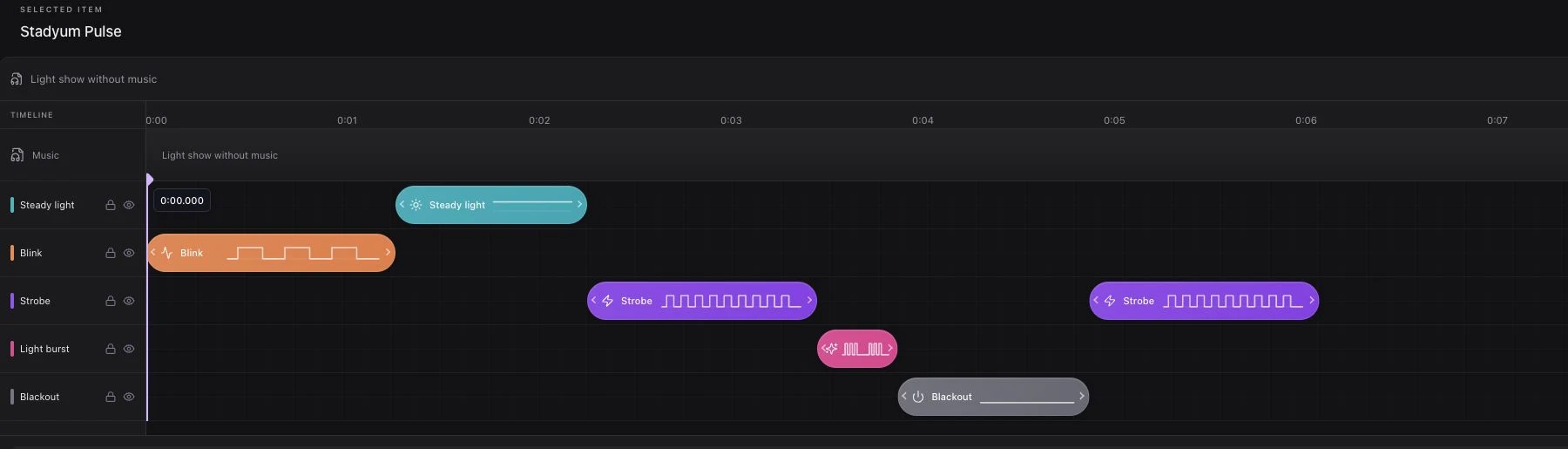
Studio brings the event flow, the selected item's light timeline, phone-screen colors, and playback controls together. Changes save automatically, with a visible status when saving needs attention.
Preview runs on the operator's device. It lets your team check an idea before sending it to participants.
Live Participation
Go live opens the event session without starting the lights. Play starts the selected item or the prepared flow. Stop cancels playback while leaving the session open. End event closes the session and returns participants to a waiting state.
Guests can join ahead of the live session. They do not need to scan the same QR code again when the event goes live.
Where Teams Use It
| Team | Show moment | Preparation focus |
|---|---|---|
| Stadium production | Player entrance or halftime | QR visibility and the game-day cue |
| Concert production | Encore or closing song | Music timing and artist approval |
| Festival operations | Main-stage finale | Coverage across the audience area |
| Brand and agency teams | Campaign reveal | Screen colors and brand presentation |
| Corporate event teams | Opening or celebration | Clear guest instructions and rehearsal |
Explore stadium light shows, concert light shows, and brand activations for the different production needs.
Plan for the Venue, Not Just the Screen
A phone-based experience removes the need to distribute dedicated audience wristbands. It still requires preparation: suitable venue screens, reliable audience connectivity, a clear invitation, and an operator who owns the live cue.
Rehearse with a mix of devices in the intended audience area. Confirm which phones use screen light, which support flashlight control, and how the join page behaves when a connection drops.
Define Useful Reporting
Connected and ready participant counts help the operator understand the current session. They should not be presented as unique people, sponsor impressions, or social reach without separate evidence.
Agree on the observations your team needs before the event. Keep production notes and any external campaign measurement distinct from the live operational view.
See the Workflow
Request a demo to walk through event creation, Studio preparation, QR participation, and the live controls using a scenario that fits your production.