Give Fans a Role in the Atmosphere
Fans already create a stadium's sound and energy. A shared light moment adds a visual part they can take in together. The purpose is participation: supporters see their phones contributing to the same game-day cue.
Design the moment around the team's identity. Colors, the chosen music, and the announcer's invitation should feel familiar to the audience. Technology should support that story without requiring a complicated explanation.
Choose the Right Moment
Before the Game
A player entrance or season-opening presentation gives fans a clear reason to prepare. Display the QR invitation ahead of the cue and leave enough time for guests to join before attention turns to the field.
Halftime
Halftime allows a planned sequence to sit beside a performance, celebration, or sponsor presentation. Rehearse it against the production schedule, including the end cue before play resumes.
A Shared Celebration
A short sequence can support a suitable celebration, triggered by the operator. Keep it within the approved event plan and respect the needs of spectators following the game.
Learn more about the setup on the stadium light show page.
Make Participation Understandable
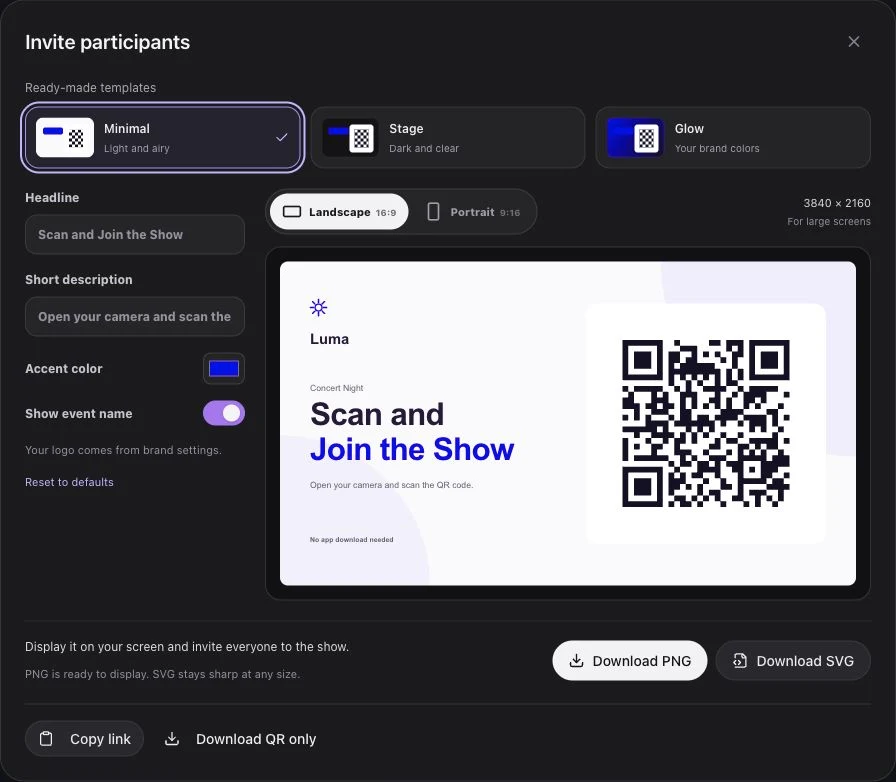
- Display a large QR code that is readable from the intended seating areas.
- Give one short instruction: “Scan and join the show.”
- Explain that camera permission supports the flashlight, with screen light available as a fallback.
- Show a clear waiting state before the operator starts playback.
- Invite participation before the production cue, rather than during a key sporting moment.
- Keep joining voluntary and essential event information available to everyone.
A guest can prepare before the live session opens and does not need to scan again when the event goes live.
Keep Production Controls Clear
Preview is local to the operator. Go live opens the session; Play starts the prepared lights. Stop ends playback while leaving the session open, and End event returns guests to waiting.
This distinction helps the stage, audio, and screen teams rehearse the correct cue. Opening participation should not unexpectedly start the show.
Review Participation Without Overclaiming
| Evidence | What it can tell you |
|---|---|
| Connected participant count | The current number of connected devices |
| Ready participant state | Whether guests are prepared for the cue |
| Rehearsal observations | QR readability, device behavior, and connectivity |
| Audience feedback collected separately | How fans describe the experience |
| Approved production footage | How the light moment appeared from selected positions |
These are different kinds of evidence. A device count alone does not establish unique people, social reach, or a sponsor's results.
Build a Repeatable Ritual
Use the first event to refine the invitation, QR placement, show length, and timing. Keep a production note for the next game instead of assuming the same audience conditions will always apply.
Request a demo to design a sample team-color moment and check the fan journey with your production team.