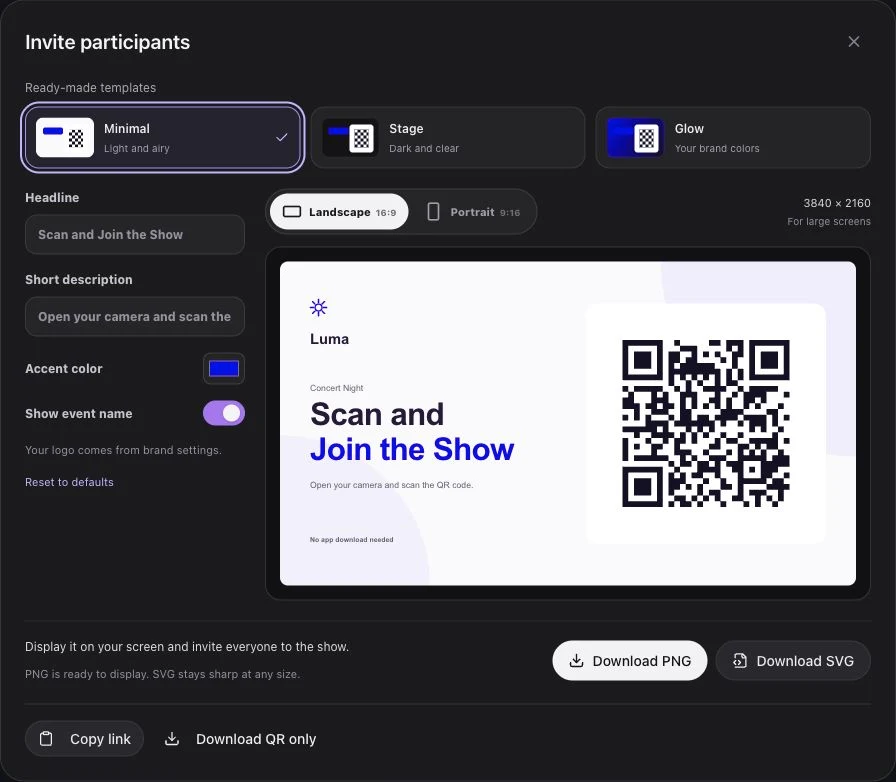
At a corporate meeting or product launch, audience participation should make the shared moment clearer. A QR-based phone light show can turn a closing cue, team welcome, or reveal into a simple action: attendees join on their own phones, wait together, and light up when the operator starts the sequence.
For US event producers and brand teams, the planning work is the brief and the handoff. The experience needs to fit the room's existing screen, audio, speaker, and stage plan. It should not require guests to learn a new interface during the most important part of the program.
Write the participation brief before the visual brief
Describe what the attendee is asked to do and why that action belongs at this point in the program. For example: “At the closing message, guests raise their joined phones for a shared brand-color moment.” That is specific enough for the producer, speaker, and operator to rehearse together.
Choose one primary moment. A product reveal, an all-hands closing, and a partner recognition cue have different timing needs. Combining them into a continuous activity can leave guests holding phones throughout a program that should have their attention on stage.
Keep the creative promise within the product. Luma Crowd provides a browser joining page, prepared light and screen-color effects, and live operator control. A phone light sequence is not automatically a voting system, an attendee identification tool, or a seat-by-seat video display.
Design an invitation guests can understand immediately
Use an invitation graphic with the company or event logo, a prominent QR code, and one short line: “Scan and join our shared light moment.” Display it when guests have time to use their phones, before the speaker's cue.
Have the host explain the complete action once: scan, tap Join, and keep the page open. The page can prepare attendees before the live session opens, using the same fixed QR. There is no need to interrupt the reveal with a new code.
Check the projected graphic from the rear and sides of the room. If the program uses both landscape stage screens and portrait displays near the entrance, choose the matching invitation export for each. A large logo should support recognition while leaving the code easy to scan.
The QR code light show overview describes the participant flow. Luma Crowd requests camera access after Join and uses screen light if permission is declined or flashlight access is unavailable. Let guests participate with that available mode; do not frame a camera prompt as a requirement to be part of the event.
Separate rehearsal, live readiness, and playback
Create an event and add the music to its flow. In Studio, prepare the light effects and phone screen colors around the stage cue. Choose a restrained palette that reads as the brand without adding a different color on every beat.
Use Preview while editing. It plays locally on the operator's device and does not send the sequence to audience phones. Complete and save the draft before the live rehearsal with participants.
The live controls have distinct jobs. Going live opens the session; Play begins the selected item or flow. Stop cancels the current playback and queued items but leaves the session live. Finish event closes it and returns participants to waiting. Put those words into the show notes so a producer's “standby” cannot be mistaken for a start cue.
Give the speaker and operator one shared cue
Write the final handoff into the run of show. A speaker can introduce the action while the operator watches the ready state, but one person should call the actual start.
| Production moment | Audience-facing action | Operator action |
|---|---|---|
| Before the segment | Invitation graphic and host instruction | Confirm the event and prepared flow |
| Standby | Guests wait with the page open | Open the live session and check readiness |
| Shared cue | Speaker asks guests to raise phones | Play on the agreed show-call instruction |
| End of the moment | Attention returns to the stage | Stop playback or finish the session as planned |
Rehearse the exact wording. “Join now” is an onboarding instruction. “Raise your phones” is a staging instruction. Neither should replace the operator's agreed cue from the show caller.
Have an early-stop instruction ready if the speaker moves ahead or the segment is cut short. A good handoff includes the return to the program, not just the first light.
Account for multiple rooms and changing plans
One Luma Crowd customer account has one live event at a time. A team can prepare another event while a session is active, but it must finish the current session before opening the next one. Do not plan simultaneous breakout-room sessions on the assumption that each prepared event can be live independently under that account.
Test the participant page on the venue network with phones placed around the room. Include screen-light fallback, a late joiner, and a reconnecting device. If the production schedule changes, leave guests waiting until the show caller confirms the new window.
Keep the joining graphic available for those who missed the first instruction. Avoid turning a short shared moment into a long troubleshooting exercise on stage. The host can carry on with the program while the operator decides whether the planned light cue is ready.
Define useful evidence without inventing campaign results
Connected and ready counts help the crew understand participation state. They are not unique attendee records, an attention score, or proof of a business outcome. Account-level operational reports should be described accurately and kept separate from any campaign research managed by the brand team.
For the post-event debrief, note whether guests understood the invitation, the stage cue matched the show flow, and the operator could end the moment cleanly. Those observations can improve the next program without attaching an unsupported engagement percentage.
For a larger audience format, compare the handoffs in our basketball arena guide or the timing considerations in the ballpark guide. Plan a Luma Crowd demo around your actual room layout and speaker sequence.